Service Pack Previews provide you with an early look at the new features and updates that will be provided in the upcoming release. However, in the weeks after this Service Pack Preview is published, the release preview page may change with items being added, modified, or removed. When a final draft of the Service Pack is published, the “Preview" label is removed and no further planned updates are made to it.
SSO and MFA Removal from Encompass Developer Connect
Single Sign-On (SSO) and Multi-Factor Authentication (MFA) settings were made available in Encompass web and desktop settings in release 26.2. As part of this service pack, the SSO and MFA settings are being removed from Encompass Developer Connect.
Prior to Encompass 26.2, administrators managing their company's SSO and MFA setup and preferences utilized the setup screens located in Encompass Developer Connect. With the Encompass 26.2 release, these settings were made available in the Encompass web interface's Admin portal. (These settings in the Encompass web interface's Admin portal can also be accessed from settings in Encompass desktop interface).
Existing setup and configuration settings are not impacted by this move, so administrators are not required to reconfigure their existing SSO and MFA setup.
Fixed Issues
EDC-1312 - A change done in release 26.2 caused an issue with the following APIs where the default behavior on the 'includeArchivedLoans' boolean attribute began setting the default to true instead of false. The default for this attribute is supposed to be false to not include archived loans. A fix to return the default to false is being applied in the 26.2 August Service Pack release.
EDC-1313 - Fixed an issue for subscribers to the Condition Webhook. Certain changes in condition tracking statuses were not being recognized. With this fix, you should now receive conditions webhooks for these tracking status changes.
Partner Plugins Enhancements
Today, partner plugins do not receive events for field changes done by business rules, calculations or field triggers. To bring parity to Encompass desktop that does have this functionality, partner plugins will be enhanced in this release to start receiving field changes done by these activities.
To ensure you are viewing the very latest of this website, best practice is to clear your browser's cache, especially after any major releases. For instructions on clearing cache, visit a link below for the browser you are using:
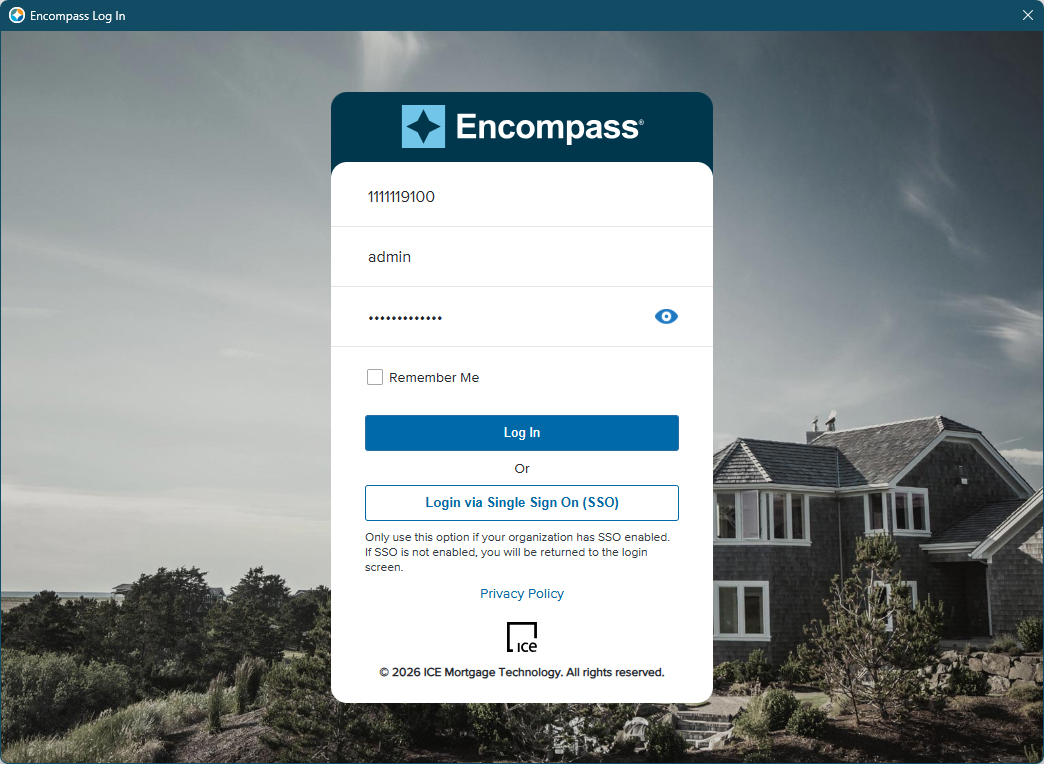
All Encompass products now utilize a new single, unified web-based login page that is more consistent with the current Encompass desktop interface login experience. Products like the Encompass web interface and Encompass Consumer Connect that previously used a two step login process (where a user entered their instance, and then navigated to a new screen to enter their user credentials) now use a single consolidated login page. The new Encompass login page looks like this:
When logging into other Encompass products (listed below), the same log in screen is provided. Depending on which product you are logging into, there may be some minor differences in the login screen related to the SSO button (discussed below) and the name of the product displayed at the top of the login screen may differ.
📘
Note that users now enter their instance ID, user name, and password on the same screen.
The Login via Single Sign On (SSO) button is now displayed for all products that support SSO (with the exception of Encompass Data Connect, Partner Marketplace, and Insights), regardless of whether the instance has SSO enabled.
If SSO is not enabled in Encompass desktop interface, users entering an instance ID and then clicking this SSO button will receive a No company associated with this Instance ID message. This is the same message and user experience provided in earlier versions of Encompass desktop interface.
If SSO is not enabled in other Encompass web applications, users entering an instance ID and then clicking this SSO button will see the screen refresh without any error messages on the user interface.
If SSO is enabled and the user is restricted to log in using SSO only, an error message is returned if they attempt to log in with a user name and password. The message instructs the user to log in using SSO.
📘
There is no impact to users who bypass Encompass login pages entirely. (For example, users launching Encompass from enterprise landing pages and federating directly.)
This new login screen is now used for the following products:
Encompass (desktop and web interface)
eFolder (when accessing the eFolder in the web interface from the Encompass desktop interface)
Encompass Consumer Connect Admin Portal
Encompass Data Connect (no SSO button will be displayed)
Data Insights (no SSO button will be displayed)
Encompass Developer Connect (This new login screen is used for the My Account > API Key, My Account > SAML SSO, and My Account > Lender MFA screens inside the Encompass Developer Connect portal only.)
Encompass eVault
Encompass LO Mobile App
Encompass TPO Connect Admin Portal
Encompass TPO Internal User Access
Encompass Partner Marketplace (no SSO button will be displayed)
ICE PPE
PRCM-1141
Updates for Single Sign-On (SSO) and Multi-Factor Authentication (MFA) Settings
MFA Now Enabled for Additional Connect Products
MFA is now available to enable for Connect products that previously did not enforce MFA. The following Connect products now support and enforce MFA when enabled in Encompass Admin Tools:
Encompass Data Connect
Encompass Developer Connect
Encompass TPO Connect Internal Login
Encompass TPO Connect Admin Portal
When MFA is enabled for these Connect products, users are required to authenticate to their corporate network by providing a user name and password, and then by providing a pin or code from their smartphone or device. Once authenticated, then they can proceed into their Connect product.
Supported MFA Providers:
The Encompass Lending Platform continues to support MFA using PingID, Okta Verify, or Duo Mobile identity providers.
Enabling MFA for Connect Products:
Use the Encompass Admin Tools > Server Settings Manager to enable (or disable) MFA for these Connect products.
To Enable MFA for Connect Products:
On your Windows task bar, click the Start menu or Start icon, navigate to the ICE Mortgage Technology program folder, and then click Admin Tools.
Double-click Settings Manager.
If you are prompted to log in to the server, type the User ID, Password, and Server that you use to log in to Encompass as the Super Administrator or the user assigned with the admin user ID.
Select Password from the Category list.
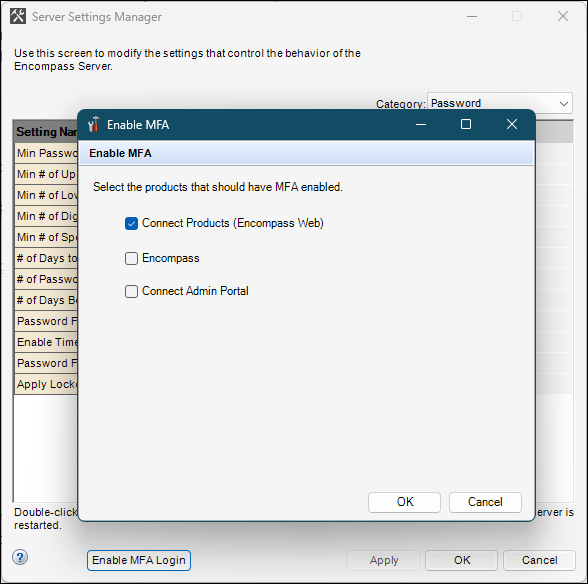
Click the Enable MFA button.
Select the Connect Products (Encompass Web) check box. (If this check box was already selected from a previous version of Encompass, then it does not need to be selected again. MFA will be applied to the additional Connect products (along with the Encompass web interface).)
🚧
You cannot selectively opt in or opt out of applying MFA for specific Connect products. If you select this Connect Products (Encompass Web) checkbox, then MFA is applied to the Encompass web interface, Encompass Data Connect, Encompass Developer Connect, Encompass TPO Connect Internal Login, and the Encompass TPO Connect Admin Portal. If this checkbox is not selected, then MFA is not applied to any of these products.
Click OK.
MFA is now enabled for these additional Connect products by default when using the PingID MFA service provider. ICE Mortgage Technology has configured PingID as your default provider. If you are using custom MFA service providers Okta Verify or Duo Mobile, please note that you must also configure your MFA service provider and the required settings in the Lender MFA settings in the Encompass web interface Admin portal to complete MFA enablement. Refer to the SSO and MFA Settings Moved to Encompass Web Interface entry below for more information.
Refer to the How to Set Up MFA for Encompass guide for information about setting up MFA for these Connect products (as well as additional products already supported for MFA (Encompass (desktop and web interfaces) and the Encompass Consumer Connect Admin Portal)).
PRCM-1141 / EDC-1269
SSO and MFA Settings Now Available in Encompass Web Interface
Prior to Encompass 26.2, administrators managing their company's Single Sign-On (SSO) and Multi-Factor Authentication (MFA) setup and preferences utilized the setup screens located in Encompass Developer Connect. With this Encompass 26.2 release, these settings are now also provided in the Encompass web interface's Admin portal. (These settings in the Encompass web interface's Admin portal can also be accessed from settings in Encompass desktop interface). Existing setup and configuration settings are not impacted by this move, so administrators are not required to reconfigure their existing SSO and MFA setup.
The SSO and MFA settings are still provided in Encompass Developer Connect as well. These settings will be removed in a future Developer Connect release.
Managing SSO and MFA Connections in Encompass Web Interface
After the administrator has configured their IdP (Identity Provider) and collected the XML metadata file from the configuration, they can visit the SAML/SSO Setup page or the Lender MFA page in the Encompass web interface Admin portal to set up a new SSO or MFA connection or modify existing connections.
SSO Connections
You can create up to 10 connections SSO connections on the SAML/SSO Setup page, but only one can be active at a given time for a given application. You cannot have two connections for Encompass activated simultaneously. However, you can have a connection for Encompass desktop interface and a connection for Encompass web interface activated at the same time.
To Set Up the SAML SSO Connection in Encompass Web Interface:
Log into the Encompass web interface with Super Administrator credentials or with the admin user ID.
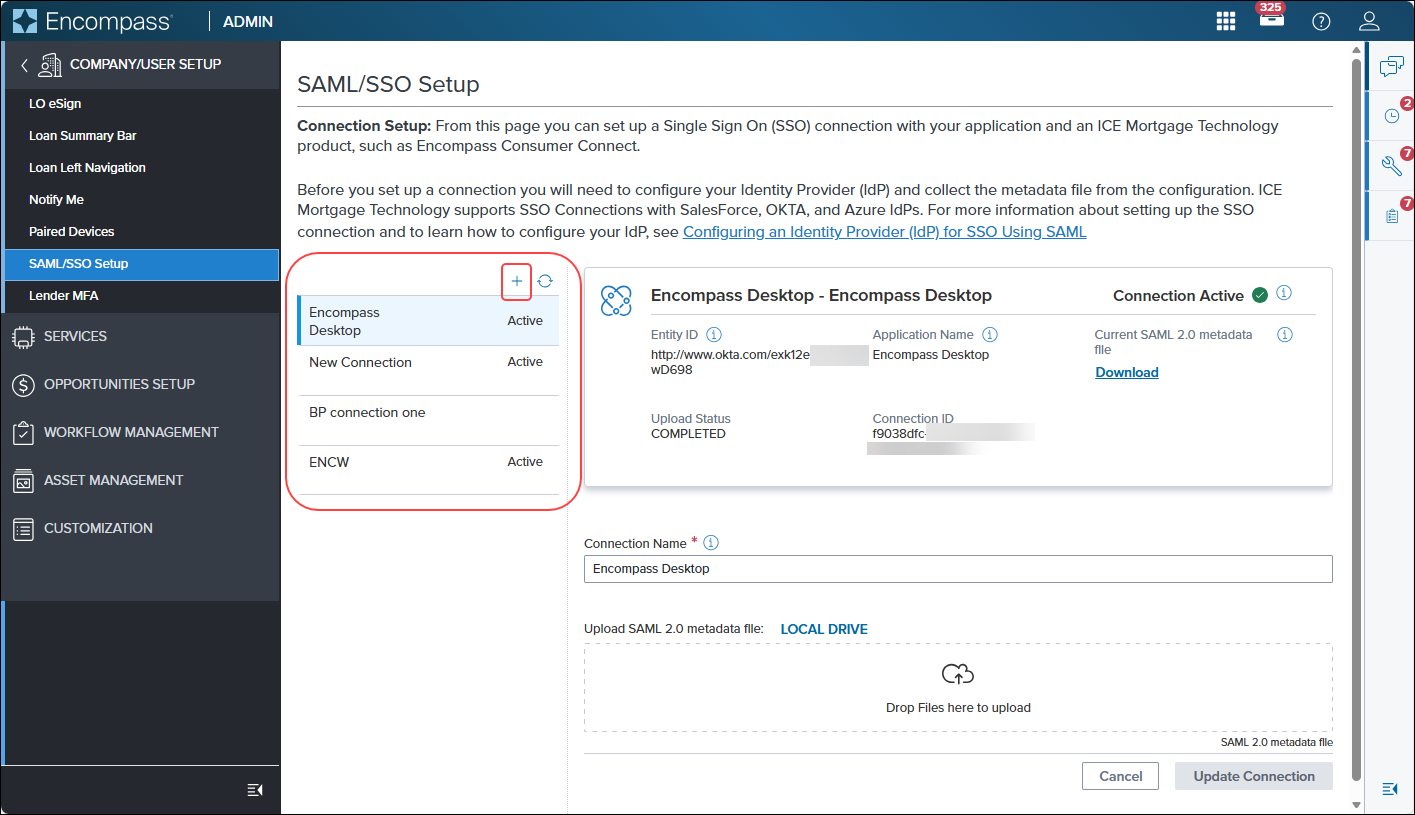
One the left panel in the Admin portal, click Company/User Setup, and then click SAML/SSO Setup.
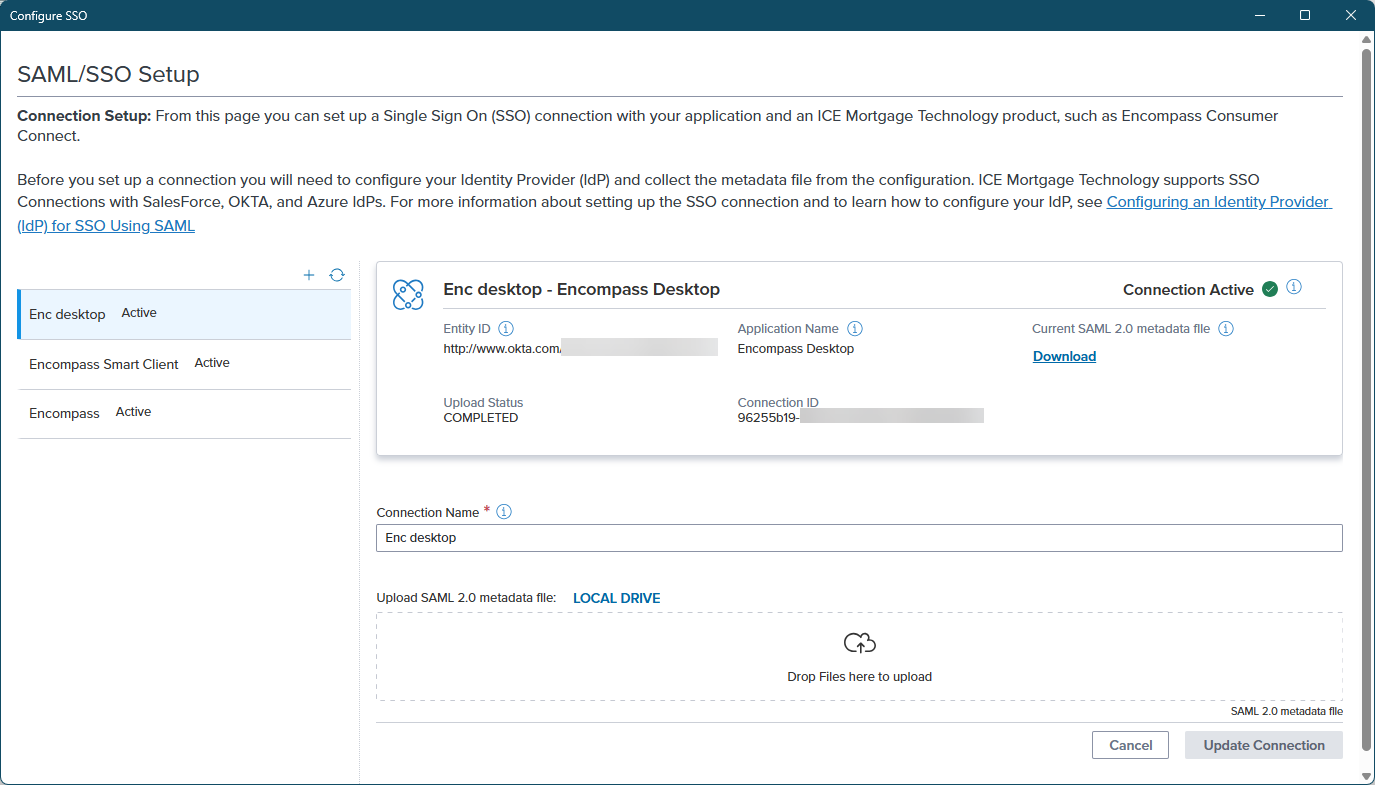
On the SAML/SSO Setup pop-up screen, the existing SSO connections are listed. There you can click the Add (+) icon to create a new connection.
For existing connections, administrators can edit the Connection Name field and upload a new metadata file.
MFA Connections
The Encompass Lending Platform supports MFA using PingID, Okta Verify, or Duo Mobile identity providers.
To Set Up the MFA Connection in Encompass:
Log into the Encompass web interface with Super Administrator credentials or with the admin user ID.
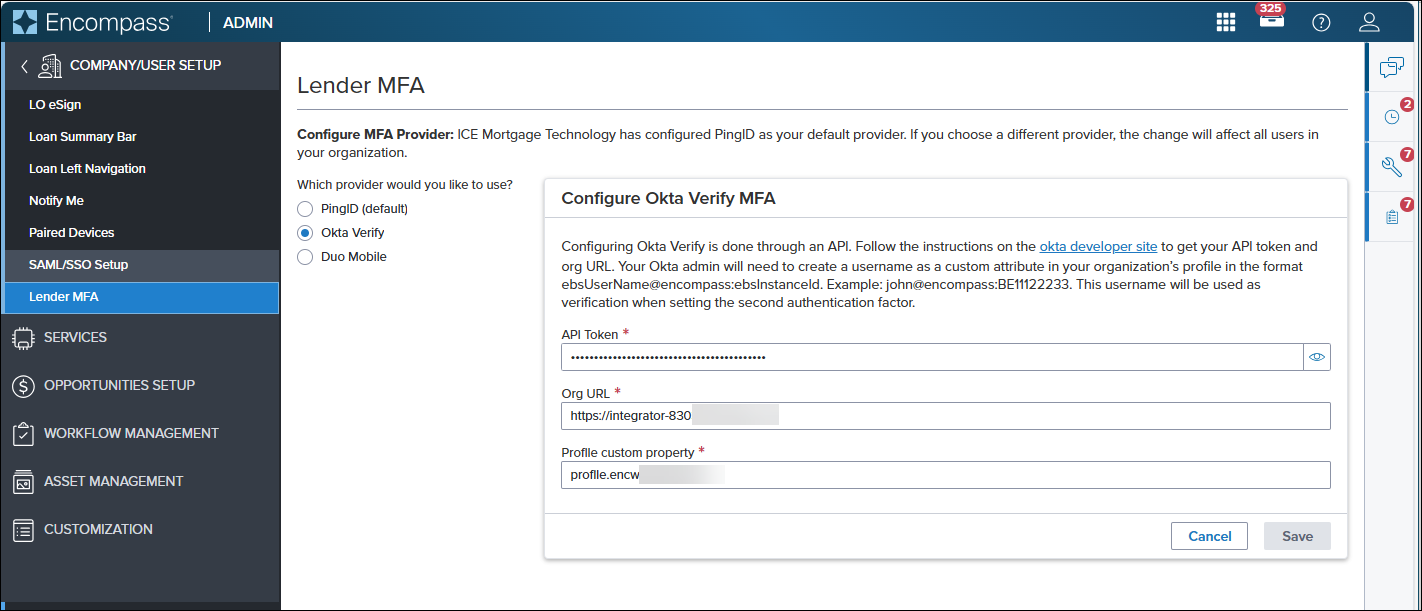
On the left panel in the Admin portal, click Company/User Setup, and then click Lender MFA.
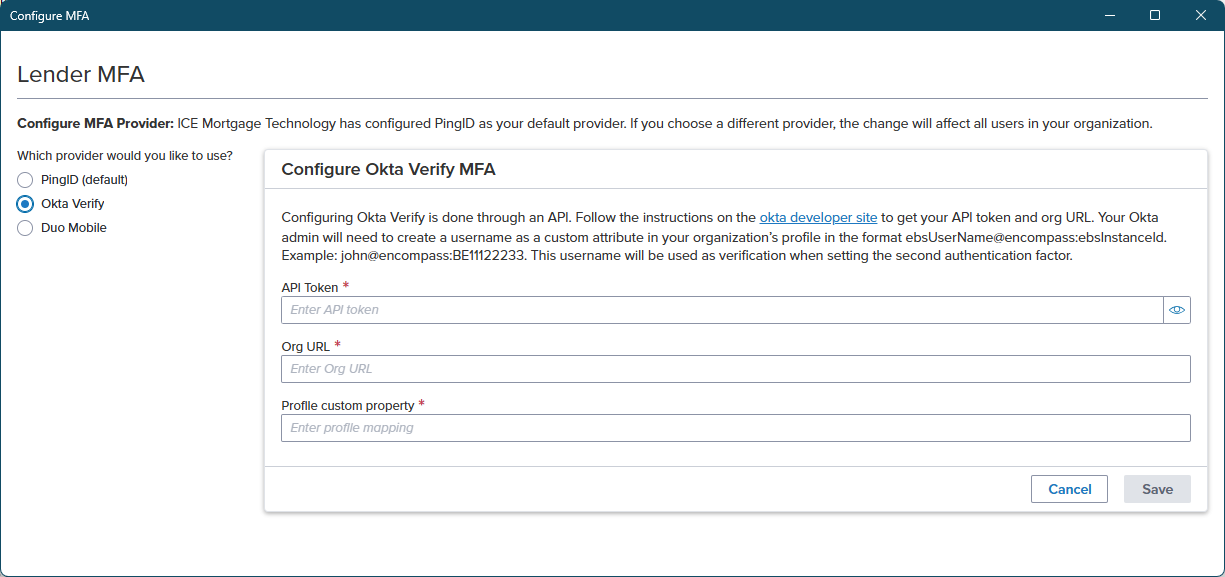
On the Lender MFA page, select the MFA provider you would like to use.
If the MFA connection has already been configured, the required information is displayed in the associated fields. Here administrators can modify existing connection information or enter new connection information.
Managing SSO and MFA Connections via Encompass Desktop Interface
After the administrator has configured their IdP (Identity Provider) and collected the XML metadata file from the configuration, they can visit the SAML/SSO Setup page or the Lender MFA page in the Encompass web interface from the Encompass Settings to set up a new SSO or MFA connection or modify existing connections.
To Set Up or Access the SAML SSO Connection from Encompass Desktop Interface:
Log into the Encompass desktop interface with Super Administrator credentials or with the admin user ID.
On the menu bar in Encompass, click Encompass, and then click Settings.
On the left panel, click Company/User Setup, and then click Company Information.
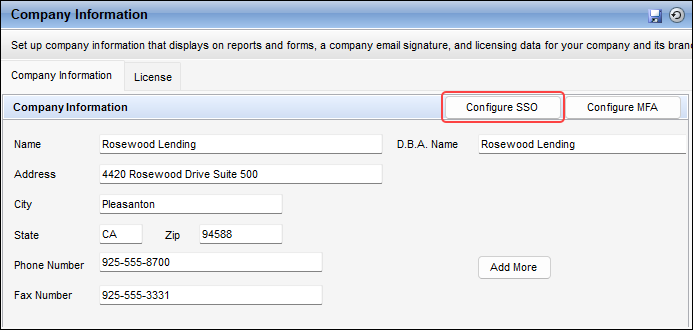
On the Company Information tab, click the Configure SSO button.
On the SAML/SSO Setup pop-up screen, administrators can set up an SSO connection or edit an existing SSO Connection.
To Set Up or Access the MFA Connection from Encompass Desktop Interface:
On the menu bar in Encompass, click Encompass, and then click Settings.
On the left panel, click Company/User Setup, and then click Company Information.
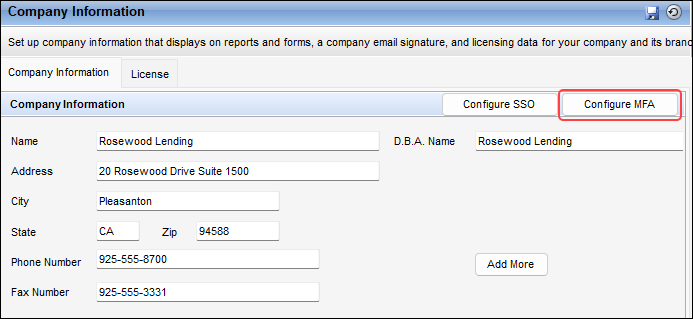
On the Company Information tab, click the Configure MFA button.
On the Lender MFA pop-up screen, administrators can set up an MFA connection or edit an existing MFA Connection.
The SSO and MFA settings will be removed in Encompass Developer Connect as part of a 26.2 August Service Pack.
NICE-57110, PRCM-874, PSS-92414
ENCOMPASS SOFTWARE DEVELOPMENT KIT (SDK)
❗️
SDK to API Transition Deadline Change
The deadline to transition from legacy Encompass SDK (Software Development Kit) integrations to APIs (as previously announced in the 25.2 release notes) has changed. Please see the latest deadline information published in the official Encompass SDK Transition page.
ENCOMPASS DOCUMENTS APIs
New Attributes Added to Generate Document Package APIs (update)
The response contracts for the following Generate Document Package APIs have been enhanced to include new attributes documentTitle and displayName. These attributes enable you to provide user-friendly document titles and names; especially helpful for separate document flows.
Get Opening Doc Set GET /encompassdocs/v1/documentOrders/opening/{orderId}/documents/{jobId}
Get Closing Doc Set GET /encompassdocs/v1/documentOrders/closing/documents/{jobId}/{orderId}
Get a Print Order GET /encompassdocs/v1/documentOrders/ondemand/{orderId}
EDC-1282
ENCOMPASS LOAN APIs
New Amortization Schedule Calculator API (new)
The following new Amortization Schedule Calculator API has been added that enables you to calculate and return detailed amortization payment schedules. The schedule can be provided in the context of a loan, or payment schedule scenarios can be provided by passing the V3 Loan object in the request payload. The API supports the following scenario types: ActualCase, BestCase, and WorstCase. In addition, the API supports Complete and Yearly schedule formats, providing comprehensive payment breakdowns including principal, interest, mortgage insurance, and balances over the loan term.
New Assign Tracking Status Access Rights Capability for Enhanced Conditions (update)
The following API has been enhanced to enable a Tracking Owner of an Enhanced Condition to extend any tracking status access rights they currently have to another owner/role. This allows roles that are not listed as Tracking Owners, within the Condition Type Settings, to update Tracking Statuses on the conditions that have been delegated to them.
Once a role has been delegated to manage Tracking Statuses, that means a user with that role can manage tracking statuses, using either of the following APIs:
EnhancedConditionContract has been updated with a new 'delegatedTrackingStatuses' collection. This collection identifies the Tracking statuses that have been delegated, and the additional delegated roles that can update them. This information can be retrieved in the following APIs:
New Scheduled Fulfillment Date for Disclosure Tracking APIs (update)
The following APIs have been enhanced with a new 'scheduledDate' attribute added to the fulfillment contract. This provides the ability to view the scheduled fulfillment date for disclosure packages.
ICE Mortgage Technology will be using the following new IP addresses for webhook APIs starting October 2026 for UAT and November 2026 for production. If ICE Mortgage Technology IP addresses are on your company’s whitelist of trusted sources, your information security or network admin team should add these new IP addresses to your whitelist by October 31, 2026 to avoid any disruption to services or integrations
New IP Ranges for UAT and Production
158.224.116.0/24
158.224.118.0/24
Timeline
UAT migration - mid October
Production migration - mid November
📘
Actual cutover dates will be shared in a future communication.
Keep Current IP Ranges Whitelisted
The following IP ranges currently in place will stay intact.
🚧
Do not remove or change the following IP ranges in your Allow List until further notice.
35.171.144.152
54.88.179.33
18.189.140.207
16.58.38.117
54.147.100.150
35.171.234.41
3.141.95.93
52.14.87.76
For questions, please contact our ICE Mortgage Technology Support team.
New Status Query Option Available for Get Webhook Event APIs (update)
The following APIs have been enhanced to support a new “DeliveryFailedExhaustedRetries” status that can be used to retrieve webhook events that have failed delivery after all the retries have been exhausted. When the "status" query parameter is used, the response returns only event history records matching that status.
On a successful 2XX response, the response body only returns the HTTP status code in the tokenTestOKResponse object.
Failure responses are now structured consistently with clear, actionable messages in a tokenTestFailureResponse object. Each failure response includes the following:
A human-readable message with the token URL and error context.
An errorCode (for network/TLS errors) or status (for HTTP errors). See the new Usage Notes in the Test Webhook Custom Auth Parameters endpoint page for details regarding the Error Codes and Statuses that can return.
EDC-1296
BREAKING CHANGES
👍
Be sure to visit the Breaking Change Notices page to see a list of ALL breaking changes documented for past and future releases.
Breaking Changes for 26.2 Release
V3 Loan APIs to Return Custom Fields as "null" Instead of Empty
As of release 26.2, the responses on the following APIs are returning "null" instead of empty strings on Custom Fields when the 'includeEmpty' query is true and the Custom Fields have no value. This represents a breaking change to these APIs.
Fulfillment TrackingNumber Being Removed from the Fulfillment Object
Currently, the Disclosure Tracking GET APIs include a 'trackingNumber' attribute both at the fulfillment object and within each fulfillment.recipient object in the API response. The 'trackingNumber' under fulfillment.recipient was introduced in the December 2025 Service Pack 1 to support tracking numbers uniquely per recipient.
As of release 26.2, the 'trackingNumber' attribute at the fulfillment level has been removed, as it has been fully replaced by the per‑recipient 'trackingNumber' within fulfillment.recipient object. This update introduces a breaking change for the following APIs:
Value for 'entityType' Change - External Organizations
In release 26.3, the value for the 'entityType' attribute in the 'parentOrg' and 'assignedToOrgs' objects of the External Organization contract will return as "ExternalOrg" instead of "Organization" to distinguish between an internal and external organization. This affects the following APIs:
Piggyback LINK Attributes Changing to RetrieveOnly
In release 26.3, all Piggyback LINK attributes will be made RetrieveOnly (see Attirbutes list below). This change is needed to support the calculations that keep Piggyback loan data in sync as data changes between linked loans. Users should not directly update these attributes.
Notes:
This change will not affect any Encompass calculations.
This will impact integrations with Encompass Loan APIs (see Impacted APIs list below). Any integrations that update these attributes directly will be impacted. Starting with release 26.3, you will no longer be able to update these attributes. These attributes will only be updated through Encompass Piggyback automation.
This change impacts the ability for any Encompass business rules to update these attributes. For questions regarding business rules configuration, contact your company's Encompass Administrator.
V3 Field Writer POST /encompass/v3/loans/{loanId}/fieldWriter
Attributes:
Property Name
Field ID
DataType
Field Requirements
LinkedLoanPurposeType
LINK_19
string
RetrieveOnly
LinkedBorrowerRequestedLoanAmount
LINK_1109
number
RetrieveOnly
LinkedIsConstructionPhaseDisclosedSeparately
LINK_4084
boolean
RetrieveOnly
LinkedMortgageType
LINK_1172
string
RetrieveOnly
LinkedLienPriorityType
LINK_420
string
RetrieveOnly
LinkedInitialAdvanceAmount
LINK_1888
number
RetrieveOnly
LinkedClosedEndPrimaryMortgageLoanAmount
LINK_4487
number
RetrieveOnly
LinkedClosedEndSubordinateMortgageLoanAmount
LINK_4488
number
RetrieveOnly
LinkedHelocNewFinancingNotLinkedDrawAmount
LINK_4489
number
RetrieveOnly
LinkedHelocNewFinancingNotLinkedCreditLimit
LINK_4490
number
RetrieveOnly
LinkedAmountApplyToDownPayment
LINK_4493
number
RetrieveOnly
LinkedHELOCLienPosition
LINK_4494
string
RetrieveOnly
LinkedLoanNumber
LINK_364
string
RetrieveOnly
LinkedBaseLoanAmount
LINK_2
number
RetrieveOnly
LinkedProposedOtherMortgagesAmount
LINK_229
number
RetrieveOnly
LinkedProposedOtherAmount
LINK_234
number
RetrieveOnly
LinkedProposedFirstMortgageAmount
LINK_228
number
RetrieveOnly
LinkedMax5YrsPrincipleAndInterest
LINK_QM.X337
number
RetrieveOnly
LinkedLenderName
LINK_1264
string
RetrieveOnly
LinkedPaymentDeferredFirstFiveYears
LINK_URLA.X209
boolean
RetrieveOnly
LinkedAffordableLoan
LINK_URLA.X210
boolean
RetrieveOnly
LinkedRequestedInterestRatePercent
LINK_3
number
RetrieveOnly
LinkedHelocQualifyingPaymentAmount
LINK_5025
number
RetrieveOnly
EDC-1298
Obsolete Properties Being Removed from Loan Contract
In release 26.3, the following properties are being removed from the loan.rateLocks section of the V1/V3 loan contract. These orphaned properties do not have corresponding field IDs in Encompass and do not exist on the loan.
Because these properties are being removed from the V1/V3 loan contract, this is a breaking change if you are integrating with them using any of the following APIs. Ensure these properties are removed from any Encompass Developer Connect integrations prior to release 26.3.
Be sure to visit the Deprecation and Sunset Notices page to see a list of ALL deprecations and sunsets documented for past and future releases.
Developer Forum Sunset
On June 25, 2026, ICE Mortgage Technology is sunsetting the Developer Forum site that was previously available to access under the Community menu and Table of Contents category of this Encompass Developer Connect (EDC) site. Therefore, the Community menu and Table of Contents category are being removed from EDC in release 26.2. The Blogs option that was also available under these Community options will be moved to reside under the Guides tab in a new Blogs category.
EDC-1290
Sunset of V1 eFolder Attachment APIs
As mentioned in previous release notes, a series of V1 eFolder Attachment APIs are scheduled for sunset in release 26.3. For more details and the alternative API endpoints to use, see Sunsetting V1 eFolder Attachment APIs in the Deprecation and Sunset Notices page.
EDC-1186
Sunsetting 'createAuthCode' Method
The 'createAuthCode' method previously announced as being deprecated with the 23.3 release, will be officially sunset in the upcoming 27.1 release. See the original deprecation notice for more details regarding the alternative getAccessToken() method that should now be used.
EDC-1300
GUIDES
The ICE Mortgage Technology Scripting Objects Reference page in the Encompass Customization Developer’s Guide has been enhanced to include more details regarding whether objects, methods and events are included in Encompass web versus Encompass desktop or both. A new callout also added that links to an Encompass Web Custom Form Toolbox guide available in the ICE Resource Center.
LOAN SCHEMA CHANGES
The Encompass Loan Schema is updated with every major release to include new fields and update existing fields to support new features and to stay up-to-date with regulatory requirements. For the full list of the added and update fields, please refer to the following links:
New Maximum Character Limit Added for resolutionComment Attribute (update)
The resolutionCommentattribute in the following Task APIs previously had no maximum character limit. As of April 16, 2026, the limit is now enforced at 1,000 characters.
Requests submitting a resolutionComment exceeding 1,000 characters will be rejected; however, existing task comments previously saved with a char limit greater than 1,000 will not be rejected, unless included in the request. Ensure existing integrations are updated accordingly.
To ensure you are viewing the very latest of this website, best practice is to clear your browser's cache, especially after any major releases. For instructions on clearing cache, visit a link below for the browser you are using:
As part of a modernization effort for ICE API documentation, the layout of API Reference is undergoing reorganization. Over time, you will see API endpoints moved to more logical categories and groupings. In addition, the standalone contract pages will be slowly going away, and the details of the request and response bodies will be contained within each endpoint definition. The following API endpoints are a few examples:
Update PingID® Mobile App to Maintain Push Authentications on Android
Starting March 6, 2026, an Android security update from Google will impact older versions of the PingID® mobile app. If you’re using the Android edition of the PingID® mobile app with a version earlier than 3.3.1, you will not be able to approve login requests via push notifications.
Who is affected - Encompass customers who use the Android edition of the PingID® mobile app as their multi-factor authentication (MFA) provider when logging into Encompass or other ICE Mortgage Technology applications.
What You Need to Do - To keep logging in without interruptions, update the PingID® mobile app to version 3.3.1 or later on your Android device.
🚧
After March 6, 2026, older versions will no longer support push notifications.
SSO and MFA Administration Changes Coming in Release 26.2
Currently, administrators managing their company's Single Sign-On (SSO) and Multi-Factor Authentication (MFA) setup and preferences utilize the setup screens located in Encompass Developer Connect. With the Encompass 26.2 release currently planned for July 2026, these settings will be removed from Encompass Developer Connect. Beginning in 26.2, these settings will now be provided in the Encompass web interface's Admin portal, in addition to Encompass desktop interface. Existing setup and configuration settings will not be impacted and hence administrators will not be required to reconfigure their existing SSO and MFA setup. More information will be provided about this update in the coming weeks.
EDC-1270
Encompass Login Unification and Connect MFA Enforcement Coming in Release 26.2
In upcoming release 26.2, the login experience for all Encompass products will be improved through a shared, single unified web login page. Products that previously used a two-step login (instance → credentials), such as Encompass Web and Connect products, will begin using a single consolidated login page. There will be no impact to customers who bypass Encompass login pages entirely (e.g., launching from enterprise landing pages and federating directly).
In addition, the following Encompass Connect products will now support and enforce MFA when enabled in Encompass Admin Tools (Admin tools > Settings Manager > Password > Enable MFA Login > Connect Products):
Data Connect
Encompass Developer Connect
TPOC Internal Login
TPOC Admin Portal
More details and information regarding both of these updates will be provided in the coming weeks.
EDC-1279
ENCOMPASS SOFTWARE DEVELOPMENT KIT (SDK)
❗️
SDK to API Transition Deadline Change
The deadline to transition from legacy Encompass SDK (Software Development Kit) integrations to APIs (as previously announced in the 25.2 release notes) has changed. Please see the latest deadline information published in the official Encompass SDK Transition page.
ENCOMPASS LOAN APIs
Pagination and View Added to Get Attachment APIs (update)
New pagination and view parameters have been added to the following APIs for improved performance:
V3 Get an Attachment GET /encompass/v3/loans/{loanId}/attachments/{attachmentId}
EDC-1241
Restricted Attribute Added for Resource Lock APIs (update)
📘
Your company must have the Encompass desktop Shared Loan Lock feature enabled to receive this functionality. For additional information on the Encompass desktop Shared Loan Lock feature, as well as instructions on how to enable this, please see the Encompass Release Notes.
A new 'restricted' attribute has been added to the contracts for the following Resource Lock APIs. This attribute indicates that the resource lock is restricted for certain operations because the loan is also open in Encompass desktop. Restricted loan operations are prohibited by the API user, while the loan remains open in Encompass desktop. The restricted operations include the following: Create or Delete Borrower Pair, and Swap/Move Borrowers
New Query by Compliance Fields Import Option (update)
The following API has been updated to include a new 'complianceFieldsImportOption' query parameter to specify import options of Correspondent Compliance fields from the MISMO 3.4 loan file (i.e., Mavent fields).
You can specify one of the following options with this query parameter:
IncludeComplianceFields - The default value and indicates import all fields.
ComplianceFieldsOnly - Use for importing only compliance fields.
SkipComplianceFields - Use for skipping compliance fields while importing.
EDC-1267
New Borrower Associations and Verification Validations (update)
The following API has been enhanced to retrieve borrower/coborrower associations and URLA verification record associations. To facilitate these new enhancements, new 'borrowers' and 'verifications' attributes have been added.
These new attributes are currently in beta mode and are not ready for production use.
EDC-1262
SECONDARY and TRADES APIs
New Loan Trade APIs (new)
The following APIs have been added to enable creating/managing Loan Trades, assigning/updating loans on a Loan Trade and managing Loan Trade documents:
As part of these trade API enhancements, the following endpoints have been updated to include options to retrieve by Loan Trade in addition to Correspondent Trade:
Get Trade Pipeline of Correspondent Trade retitled to Create Trade Pipeline POST /secondary/v1/tradePipeline
New Get List of Available External Site URLs API (new)
The following new API endpoint has been added that enables you to retrieve a full list of TPO Connect site URLs that are not marked as deleted and are available to add to an external organization:
The API results can now be sorted and filtered for certain attributes/scenarios. See details in the table below:
Query Parameter
Description
filter
Use to filter the results by any of the following:
- siteId- The ID of the site URL.
- Name- The name of the org.
- companyName - The name of the org when the org type is 'company'.
- branchName - The name of the org when the org type is 'branch'.
- siteId- The ID of the site URL.
- Name- The name of the org.
- companyName - The name of the org when the org type is 'company'.
- branchName - The name of the org when the org type is 'branch'.
The API results can now be sorted and filtered. See details in the table below:
Query Parameter
Description
filter
Use to filter the results by any of the following:
- OrgName - The organization name associated to the user.
- CompanyName - The company name associated to the user.
- BranchName - The company branch name associated to the user.
- FirstName - The user's first name.
- LastName - The user's last name.
- EmailId - The user's email address.
- Phone - The user's phone number.
- PersonaId - The Persona IDs associated to the user.
- PersonaName - The Persona Names associated to the user.
- siteId - The ID of the site URL for the organization associated to the user.
- DesignatedRoleId - The Designated Role IDs associated to the user.
- DesignatedRoleName - The Designated Role Names associated to the user.
- RoldId - The Role IDs associated to the user.
- RoleName - The Role Names associated to the user.
sort
Use to sort the results by any of the following:
- OrgName - The organization name associated to the user.
- CompanyName - The company name associated to the user.
- BranchName - The company branch name associated to the user.
- FirstName - The user's first name.
- LastName - The user's last name.
- EmailId - The user's email address.
- Phone - The user's phone number.
- PersonaId - The Persona IDs associated to the user.
- PersonaName - The Persona Names associated to the user.
- siteId - The ID of the site URL for the organization associated to the user.
- DesignatedRoleId - The Designated Role IDs associated to the user.
- DesignatedRoleName - The Designated Role Names associated to the user.
- RoldId - The Role IDs associated to the user.
- RoleName - The Role Names associated to the user.
EDC-1271
SETTINGS - LOAN SETUP APIs
New ICE BI Dashboard Indicator for Loan Folder APIs (update)
The contracts for the following Loan Folder API endpoints have been enhanced with a new 'includeInIceBiDashboard' attribute. This new boolean attribute indicates when the loan folder is included in the ICE Business Intelligence (BI) dashboard.
This 'includeInIceBiDashboard' attribute requires having the ICE BI Dashboard feature enabled. Contact Client Support for more information about this feature.
EDC-1265
SETTINGS - TABLES AND FEES APIs
New API to Retrieve AMI Limit Settings (new)
The following API has been added that enables retrieving Area Median Income (AMI) limit settings configured in Encompass > Settings > Table and Fees > Affordable Lending > AMI Limits.
The following API has been added that enables retrieving Median Family Income (MFI) limit settings configured in Encompass > Settings > Table and Fees > Affordable Lending > MFI Limits.
Get a Subtask GET /workflow/v1/tasks/{taskId}/subtasks/{subTaskId}
All the endpoints listed above will include a new 'isSoftDeleted' attribute in their contracts to indicate when the loan the task and/or subtask is associated to has been soft or hard deleted.
EDC-1258
WEBHOOKS
Loan Resource Webhook Events (new)
A new Loan resource DisclosureTracking webhook event has been added.
❗️
This new webhook event is currently only in beta mode and not generally available.
EDC-1249
BREAKING CHANGES
👍
Be sure to visit the Breaking Change Notices page to see a list of ALL breaking changes documented for past and future releases.
Breaking Changes for 26.1 Release
Enhancing Error Message Descriptions for Updating Custom Fields
As previously mentioned in the 25.4 Release Notes as upcoming 26.1 breaking changes, a series of APIs have been updated to enhance error message descriptions for errors involving Custom Field updates. This is to better align with error messaging standards. For details regarding the APIs involved and the new errors, see the full notice in the 26.1 section of the Breaking Change Notices page.
As previously mentioned in the 25.4 Release Notes as upcoming 26.1 breaking changes, the following APIs have been updated to enforce persona controls. The calling user must have a super admin persona to retrieve a list of Custom Data Objects (CDOs). To ensure that partners without admin access can create and manage their own CDOs, the access controls for the V1 Create or Replace Global CDO endpoint has also been updated to remove the admin persona check. These updates represent breaking changes.
Deprecating "status" Attribute in eFolder Document Contract
As previously mentioned in the 25.1 release notes, the "status" attribute in the eFolder Document Contract has been deprecated with this 26.1 release. The following API endpoints now use the more relevant "documentStatus" attribute in favor of the "status" attribute:
Discontinue usage of the "status" attribute in favor of the "documentStatus" attribute.
EDC-1121, EDC-1235
Breaking Changes for 26.2 Release
Removal of ‘fundingFees’ Attribute in Loan Contract
As previously mentioned in the 25.4 Release Notes as upcoming breaking changes, the following APIs will now be updated in upcoming release 26.2 to no longer return the ‘fundingFees’ attribute inside the fundingFees object in the loan contract. This represents breaking changes to these APIs.
V3 Loan APIs to Return Custom Fields as "null" Instead of Empty
Beginning with release 26.2, the responses on the following APIs will begin returning "null" instead of empty strings on Custom Fields when the 'includeEmpty' query is true and the Custom Fields have no value. This represents a breaking change to these APIs.
A series of methods that have been listed as deprecated in the tpoApplication Object are now being sunset in upcoming release 26.2. For details regarding the specific methods and replacements, see the full notice in the 26.2 section of the Deprecation and Sunset Notices page.
EDC-1275
Fulfillment TrackingNumber Being Removed from the Fulfillment Object
Currently, the Disclosure Tracking GET APIs include a 'trackingNumber' attribute both at the fulfillment object and within each fulfillment.recipient object in the API response. The 'trackingNumber' under fulfillment.recipient was introduced in the December 2025 Service Pack 1 to support tracking numbers uniquely per recipient.
In the upcoming 26.2 release, the 'trackingNumber' attribute at the fulfillment level will be removed, as it has been fully replaced by the per‑recipient 'trackingNumber' within fulfillment.recipient object. This update introduces a breaking change for the following APIs:
The breaking change performance improvements regarding V3 Get All External Users mentioned in earlier release notes as an upcoming 26.1 breaking change has been moved to release 26.3. The default behavior of this API will be updated with the following enhancements for improved performance:
The API will return the response with minimal data as summary when the entities query parameter is not passed. See sample code below:
The API will return only 10 records as default response when there are no pagination query parameters passed.
EDC-1143, EDC-1256
DEPRECATION and SUNSET NOTICES
👍
Be sure to visit the Deprecation and Sunset Notices page to see a list of ALL deprecations and sunsets documented for past and future releases.
Deprecations and Sunsets for 26.1 Release
Settings: Disclosure Tracking
A series of Disclosure Tracking settings objects have been deprecated. For details regarding the specific objects and affected APIs, see the full notice in the 26.1 section of the Deprecation and Sunset Notices page.
EDC-1210, EDC-1233
Deprecating V1 Loan Importer to Create Loan API
As of release 26.1, the following endpoint will be deprecated and will no longer be supported:
V1 Loan Importer to Create Loan POST /encompass/v1/importers/loan
🚧
Discontinue using this API endpoint and transition to using the V3 Converter to Import New LoanPOST /encompass/v3/converter/loans endpoint instead.
EDC-1250
Deprecations and Sunsets for 26.3 Release
Sunsetting V1 eFolder Attachment APIs
As part of a data center migration, a series of V1 eFolder Attachment APIs will be sunset in the upcoming 26.3 release. For more details, see the Deprecation and Sunset Notices page.
EDC-1186
GUIDES
Plugin Best Practices (new)
A new series of best practices regarding Plugins has been added to the Best Practices section. See Plugin Best Practices.
A new knowledge article has been added that describes a new resource lock called Encompass desktop Shared Loan Lock that has been introduced in release 26.1. The knowledge article details the purpose of the resource lock, how it works, and important considerations for using the lock. See Encompass Desktop Shared Loan Lock and Restricted Operations.
EDC-1247
FIXED ISSUES
EDC-1252 - Fixed an issue where the V3 Get Loan API was not honoring the 'Persona Access to Loan" business rule and was allowing access to loan "Edit Custom Access" objects the rule was restricting. The API no longer returns these loan objects the business rule is restricting.
EDC-1244 - Prior to release 26.1, the loan attribute 'useEnhancedConditionIndicator' in the Loan Contract was not writable after loan creation. From release 26.1 forward, this attribute can be changed if no conditions (enhanced or standard) exist in the loan. Prior to release 26.1, there was an issue with the following standard conditions endpoints where the APIs were allowing to create standard conditions even when the loan was enabled for enhanced conditions. Starting with the 26.1 release, the APIs will fail with a 500 error if the 'useEnhancedConditionIndicator' attribute in the loan is set to true. This 500 error will be corrected to a 4xx error in an upcoming release.
EDC-1274 - As part of the 25.4 December Service Pack 2 release, an update was made to the SCIM Get Users API to retrieve a list of users for the DDA schema. An issue occurred with this update where the API response was by default returning a list of disabled users only if the 'enabled' filter was not set to true. As part of this fix, the API response now returns both the enabled and disabled DDA SCIM users when the 'enabled' filter is not sent.
EDC-1278 - An issue was fixed in the Event History API where the startTime and endTime filters could return events slightly outside the requested time window (by approximately 10–15 minutes). A refinement was made to the timestamp format used by the Event History API to improve the accuracy of startTime and endTime filtering.
KNOWN ISSUES
EDC-1253 - When attempting to move the borrower to co-borrower on an application using V1 Move Borrower Pair, the system enforces both Persona Access to Loan (PAL) and Persona Access to Fields (PAF) rules. As a result, the move application operation may fail even when the user has valid permission to move the application and borrower pair. In upcoming release 26.2, this issue is being fixed. The expected behavior after the fix is if the user has access to the loan, the user can move the borrower to co-borrower on an application.
EDC-1276 - Field Change webhook events may not be delivered in specific scenarios where the loan creation or update that triggers the event contains a payload larger than 250 KB. When this occurs, subscribers may not receive the corresponding Field Change webhook notification. This issue will be resolved in the 26.2 major release.
LOAN SCHEMA CHANGES
The Encompass Loan Schema is updated with every major release to include new fields and update existing fields to support new features and to stay up-to-date with regulatory requirements. For the full list of the added and update fields, please refer to the following links:
The SCIM Get Users API for the EncompassInternalUser schema is being enhanced to include a new query parameter called 'attributes' to support the inclusion of personas and license objects in the response.
In addition, the SCIM Get Users API for the AIQUser (DDA) schema is being enhanced to support the retrieval of a user list in the response. Prior to this change, you could only retrieve one user at a time from the DDA product by passing the userName filter in the Get Users API. Now, the userName filter is not required when retrieving the user list for the AIQUser schema.
The following fixed issues were resolved as part of this Service Pack.
PSS-88957 - Previously, when creating a SCIM user via the POST /scim2/v1/users API, the system returned a 201 status code indicating success, even if the user limit had been exceeded and the user was not actually created in Encompass.
With this fix, the API now returns an error response if the user limit is exceeded and the user record cannot be created in Encompass.
PSS-88646 - Previously, the SCIM Create User API returned a 201 Created response when the entityId field in the Organization object was provided as an unquoted integer (e.g., 7) instead of a string (e.g., "7"), as required by the API specification. The API did not return a validation error and responded with an empty body ({}), while no user was created in Encompass. With this fix, the API now validates the entityId format and returns an appropriate error if the value is not a string.
The following APIs have been enhanced to support fulfillment delivery based on the selection made in the Schedule Fulfillment For setting in Encompass. This setting can be enabled in the Additional Services > eDisclosure Fulfillment Settings.
Send Opening Package POST /encompassdocs/v1/documentOrders/opening/{docSetOrder_id}/delivery
Send Forms POST /encompassdocs/v1/documentOrders/forms/{docSetOrder_id}/delivery
Usage Notes
When the All Borrowers and NBOs option is selected in the ‘Schedule Fulfillment For’ setting, the request payload for Send Opening Package must include the borrower contact details in both the fulfillments (array of objects) and package object.
When the Primary Borrower Only (per pair) option is selected in the ‘Schedule Fulfillment For’ setting, the request payload for Send Opening Package must include the primary borrower contact details in both the fulfillments (array of objects) and package object.
If the contact details are not included in both the fulfillments (array of objects) and package object, the recipient will not receive the physical print package. However, if the contact details are included only in the package object and not the fulfillments (array of objects), the recipient will still receive the digital package.
TrackingNumber Attribute Added to Fulfillment Recipient Object
To provide support for recipient-level tracking for the fulfillment package, a 'trackingNumber' attribute provided by the Fulfillment Service has been added to the fulfillment.recipient object for the following APIs:
To ensure you are viewing the very latest of this website, best practice is to clear your browser's cache, especially after any major releases. For instructions on clearing cache, visit a link below for the browser you are using:
As part of a modernization effort for ICE API documentation, the layout of API Reference is undergoing reorganization. Over time, you will see API endpoints moved to more logical categories and groupings. In addition, the standalone contract pages will be slowly going away, and the details of the request and response bodies will be contained within each endpoint definition. The following API endpoints are a few examples:
The deadline to transition from legacy Encompass SDK (Software Development Kit) integrations to APIs (as previously announced in the 25.2 release notes) has changed. Please see the latest deadline information published in the official Encompass SDK Transition page.
Updated Versions of RestSharp and Other DLL Files
DLL files for Encompass have been updated to newer versions. If you are using the Encompass SDK and have specific versions of these DLLs referenced in your SDK, then the applications will break. Please refer to the table below for the impacted files and the new versions, and upgrade the files accordingly to avoid issues with the SDK:
“NoDiff”, “Diff” “Removed” Note: This attribute is included in the response when the document order is regenerated for a given loan.
If you initially generated an Opening Doc Set or a Closing Doc Set on a given loan using the Generate Opening Doc Set or Generate Closing Doc Set endpoints and later regenerated the Opening Doc Set or Closing Doc Set for the same loan due to changes in the loan data, some documents may have been removed from the updated document set.
If the response from the Get Opening Order Status GET/encompassdocs/v1/documentOrders/opening/{orderId} for the given Opening Doc Set, includes the attribute "difference": "removed" for any of the documents included in the Order Status, the documents denoted as "removed" MUST NOT be included in the Send Opening Package POST/encompassdocs/v1/documentOrders/opening/{docSetOrder_id}/delivery API request. Otherwise, an error will occur in document delivery.
If the response from the Get Closing Order Status GET/encompassdocs/v1/documentOrders/closing/{orderId} for the given Closing Doc Set includes the attribute "difference": "removed" for any of the documents included in the Order Status, the documents denoted as "removed" MUST NOT be included in the Send Closing Package POST/encompassdocs/v1/documentOrders/closing/{docSetOrder_id}/delivery API request. Otherwise, an error will occur in document delivery.
EDC-1226
ENCOMPASS LOAN APIs
Good Faith Fee Variance Violations (new)
The following API has been added that enables you to retrieve detailed information about Good Faith Fee Variance violation alerts on a loan (i.e., the final cost of certain settlement fees exceeds the amount estimated on the Loan Estimate, – cannot change more than 10 percent by category).
All loan APIs have been enhanced to automatically populate TPO loan entity fields from TPO external organization settings when certain fields are changed. For example, changes to any of the following fields (directly or through Business Rules) will trigger a copy from the external organization settings data down to the TPO entity on the loan:
TPO.X15 (Company ID)
TPO.X39 (Branch ID)
TPO.X62 (Loan Officer ID)
TPO.X75 (Loan Processor ID)
TPO.X96 (Correspondent ID)
This functionality was previously implemented by calling Create Loan and Update Loan APIs with the 'tpoRegister' loan action. Now, the copy of the external org settings to the loan will be accomplished by updating one or more of the fields mentioned above in the payload.
EDC-1206
SERVICES APIs
FNMA Mission Score Support for ICE PPE (update)
The following ICE PPE API has been enhanced to support the Fannie Mae Mission Score API.
Updated Default Behavior for External Orgs (update)
The default behavior for external organizations has been updated. As of release 25.4, the following API has been updated to filter the orgs when accessed by an external user (TPO) and internal users with the "sales rep/AE" persona. By default, external users will be limited to the API response data associated to the org they are assigned to. If the logged in user is an external user, the API will only return the list of orgs that the user is associated with and any child orgs (if isRecursive=true). For internal users with "sales rep/AE" persona, the list of organizations will be limited to organizations for which they are assigned as "sales rep/AE". For additional details regarding the new behavior, see the table below.
Refer to the use case scenarios mentioned below for more details:
Scenario
Existing Behavior
New Behavior
Current user is external user.
User can see all external orgs in API response.
User can see external orgs in its hierarchy, above its current org, and all child orgs if 'isRecursive' is True.
Current user is external user and has "sales rep/AE" persona.
User can see all external orgs in API response.
User can see external orgs in which current logged-in user is added as sales rep/AE.
Current user is internal user and has "sales rep/AE" persona.
User can see all external orgs in API response.
User can see external orgs for the organizations for which they are assigned as "sales rep/AE".
EDC-1205
Settings: External Users (updates)
Updated Access Controls to Retrieve External Users
The following API has been enhanced to limit the number of records returned in the API response when accessed by an external user. With this release, external users are limited to seeing the list of users within their org hierarchy. For additional details regarding the new behavior, see the table below.
Refer to the use case scenarios mentioned below for more details:
Scenario
Existing Behavior
New Behavior
Current user is external user.
User can see all external users in API response.
User can see external users within the user's current org, and all child orgs if 'isRecursive' is True. If the user passes the query orgId parameter outside their org hierarchy, an empty result set is returned.
Current user is external user and has "sales rep/AE" persona.
User can see all external users in API response.
User can see external users for organizations where they are added as a sales rep/AE.
EDC-1179, EDC-1205
Support for Org ID Value = 0 (Not Ready for Production Use)
The following API has been enhanced to allow orgId = 0 or no value in the 'orgId' query parameter. However, please note that this feature is not ready for production use.
When 'orgId' and 'tpoId' parameters are not provided, the API now defaults the parameters to 0 instead of returning an error.
If orgId=0 and isRecursive=false, the API now returns all users of the organization(s) from which the logged-in user has access, including users from the Branch and Extension.
❗️
Known Issue
The support for orgId = 0 has a known performance issue when the data is retrieved without pagination. This issue will be fixed in an upcoming release. In the meantime, when testing this feature, the API must always be used with pagination parameters with page size not exceeding 1000.
EDC-1209
Settings: Disclosure Tracking (update)
The following API has been enhanced to include a new property to indicate the default delivery method when disclosures are printed:
The following new objects have been added to enable supporting nested, parent/child settings relationships:
RecordingOfDisclosures - Replacing the existing 'disclosureRecordingTriggers' object planned for deprecation in release 26.1. Describes how disclosure entries are added to the Disclosure Tracking tool.
CopyOfDisclosures - Replacing the existing 'saveDisclosureCopy' object planned for deprecation in release 26.1. Defines whether Encompass is to save a local copy of a disclosure document when it is printed or sent electronically from within the eFolder.
ChangeInCircumstances - Replacing the existing 'changedCircumstances' object planned for deprecation in release 26.1. Indicates whether fee level disclosures are required to indicate a changed circumstance reason for each revised fee prior to sending a revised disclosure.
EarliestClosingDate - The earliest closing date.
OptInForSundayClosings- (boolean) Indicate True to opt in for Sunday closings.
OptInForFederalHolidayClosings - (boolean) Indicate True to opt in for federal holiday closings.
EDC-1210
Settings: Personas (update)
The following API has been enhanced to increase the maximum records per page from 100 to 1000:
The records per page is determined by the following:
If the 'limit' parameter value is not provided, the API defaults to 100 records per page.
If the 'limit' parameter value provided is between 1 and 1000, the API returns that number of records per page, up to 1000.
If the 'limit' parameter value provided is greater than 1000, the API returns up to 1000 records per page.
EDC-1211
BREAKING CHANGES
V3 APIs No Longer Return Empty Collections
A series of V3 APIs have been enhanced to align with the standard V3 API pattern to not return empty collections in the response. Prior to this fix, empty collections (i.e., no records in the array) were returned in the response. Starting with the 25.4 release, no empty collections will return.
Enhancing Error Message Descriptions for Updating Custom Fields
In the upcoming 26.1 release, changes are being made to a series of APIs to enhance error message descriptions for errors involving Custom Field updates. This is to better align with error messaging standards. For details regarding the APIs involved and the new errors, see the full notice in the 26.1 section of the Breaking Change Notices page.
EDC-1223, EBSP-62917
Get Loan Returning EncompassToEncompassLogs and InvestorDeliveryLogs
The following API endpoint has being enhanced to return EncompassToEncompassLogs and InvestorDeliveryLogs collections with view=entity versus previously being considered logs collections that returned with view=logs. This update represents a breaking change to this endpoint. If you need to retrieve these logs, please update the parameter view=entity to avoid disruptions.
As mentioned earlier in the 25.3 release notes and the Breaking Changes Notices, as of release 25.4, the value for the 'entityType' attribute in the Organization Entity Ref property of the External User contract will return as "ExternalOrg" instead of "Organization" to distinguish between an internal and external organization. This affects the following APIs:
The eFolder persona setting “Send Files to Lender” was recently removed from Encompass. Therefore, starting with release 25.4, the following APIs will no longer return the “SendFilesToLender” persona setting:
Removal of ‘fundingFees’ Attribute in Loan Contract
With the recent release of V3 Get Funding Fees and V3 Update Funding Balances APIs, the following API endpoints will no longer return the ‘fundingFees’ attribute inside the fundingFees object in the loan contract as of upcoming release 26.1. This represents a breaking change to these APIs.
Please begin efforts to discontinue further usage of the "fundingFees" attribute in these APIs by release 26.1. Begin using V3 Get Funding Fees and V3 Update Funding Balances APIs as alternatives.
EDC-1217
Admin Control Enforcement
The following API is being updated in release 26.1 to enforce persona controls. The calling user must have a super admin persona to retrieve a list of Custom Data Objects (CDOs). To ensure that partners without admin access can create and manage their own CDOs, the access controls for the V1 Create or Replace Global CDO API (PUT /encompass/v1/company/customObjects/{objectName}) will also be updated in release 26.1 to remove the admin persona check. This will represent a breaking change.
As previously documented, the ‘designatedRoles’ attribute in the External Users Contract was deprecated in 25.3 release and was replaced with the ‘designatedRoleRefs’ attribute. In release 25.4, the ‘designatedRoles’ attribute will be sunset and removed completely.
EDC-1208
Deprecating Get a Compliance Report API
As of release 25.4, the following endpoint has been deprecated and is no longer supported. Please discontinue using this API endpoint and transition to using Get Compliance Reports instead.
Get a Compliance Report GET /ecs/v1/compliancereports/{loanId}
EDC-1216
FIXED ISSUES
EDC-1225 - Fixed Issues for Enhanced Field Change for AUS Tracking Fields
Before Fix: Some Enhanced Field Change (EFC) webhooks were failing to generate because of errors in the EFC process. These errors occurred when certain AUS tracking fields are updated. The EFC process was unable to complete, and the entire EFC event was lost.
After Fix: The AUS field issues have been fixed, so the process can successfully generate these EFC events. Note: ICE MT does not support recovering or replaying the previously unsent events prior to the fix.
Known Issue with EFC and AUS field Changes: For AUS field changes, the EFC Payloads has the following issues:
The Log ID is not included in the payload, so the user does not know which log was updated.
If a field ID is updated multiple times, in some cases only the latest update is captured.
Example: I have two AUS Tracking logs, one for DU, and one for LP. Both logs were updated within the same loan save event. Field ID AUSF.X1 (Underwriting Risk Assess Type) was updated with values: "LP" in the first log, and "DU" in the second log.
Result: In the EFC payload, only the latest value of "DU" is captured for field AUSF.X1. The first value of "LP" was not captured.
As a result of this known issue, AUS field change data is incomplete and ICE MT suggests that it not be relied upon, except to indicate that some change to the AUS log occurred. In a future release, ICE MT will remove the ambiguous AUS field values from the EFC payload.
To retrieve current AUS log data, you can call the following APIs:
EDC-1195 - An issue has been corrected for the V3 Update Loan API where the data type for the PriorDisclosureDate (CORRESPONDENT.X57) and PriorApplicationDate (CORRESPONDENT.X62) attributes did not match the Encompass field definition. The fields have been correctly defined as Date Only format instead of DateTime.
EDC-1197 - Fixed a known issue for the V3 Get Business Contacts Category Fields and V1 Update a Business Contact APIs. Corrected an issue where negative values in the ID fields were causing the inability to differentiate internal fields from user-defined fields. To remedy this problem, the APIs now perform the following:
Returns a new attribute ‘fieldType’ as Internal.
Returns the id as INTERNAL_ (e.g., previously returned -7, now returns as INTERNAL_7).
📘
For the V1 Update a Business Contact API, the internal fields are read-only, and the ‘LegacyId’ field must be usable for all custom category fields including the new additional internal fields.
EDC-1215 - The following Known Issue posted in the Get Users API in release 25.3 has been resolved in release 25.4:
If your Encompass instance includes both SCIM and non-SCIM users (internal users without a SCIM GUID), the GET scim2/v1/users API response may not include a full list of SCIM users due to a known issue with pagination. As a workaround, generate a SCIM GUID for Encompass users created directly in Encompass (via the Encompass user interface, or via the POST/encompass/v3/users API) using the POST/scim2/v1/accountLinks API.
EDC-1221 - Fixed an issue with the V3 Get Loan API where the Valuation IDs were not being returned in the Correspondent Entity response when the 'entities' parameter was equal to Correspondent.
Before Fix: "10-000003" returned as "0003-10-01T00:00:00.000Z"
After Fix: "10-000003" remains "10-000003"
CBIZ-66320 - Update to Enable Interim Servicing Fields to be Updated via V1 APIs
When attempting to perform an update to some Interim Servicing fields by executing a PATCH V1 API from Encompass Developer Connect, users received the following error and the fields did not update:
Unable to write to the read-only InterimServicing entity
The same update was successful when using the V3 API, but the V1 API was not working successfully because all of the Interim Servicing fields were read-only for the V1 APIs. The Interim Servicing fields have been updated so that they can be updated via V1 APIs (for example, Interim Servicing Servicer Loan Number (SERVICE.X108), Interim Servicing Sub-Servicer (SERVICE.X110), and Interim Servicing Sub-Servicer Loan Number (SERVICE.X111)), except for the following fields which have remained as read-only:
The Encompass Loan Schema is updated with every major release to include new fields and update existing fields to support new features and to stay up-to-date with regulatory requirements. For the full list of the added and update fields, please refer to the following links:
Fixed Issues for Enhanced Field Change for AUS Tracking Fields
Before Fix: Some Enhanced Field Change (EFC) webhooks were failing to generate because of errors in the EFC process. These errors occurred when certain AUS tracking fields are updated. The EFC process was unable to complete, and the entire EFC event was lost.
After Fix: The AUS field issues have been fixed, so the process can successfully generate these EFC events. Note: ICE MT does not support recovering or replaying the previously unsent events prior to the fix.
Known Issue with EFC and AUS field Changes: For AUS field changes, the EFC Payloads has the following issues:
The Log ID is not included in the payload, so the user does not know which log was updated.
If a field ID is updated multiple times, in some cases only the latest update is captured.
Example: I have two AUS Tracking logs, one for DU, and one for LP. Both logs were updated within the same loan save event. Field ID AUSF.X1 (Underwriting Risk Assess Type) was updated with values: "LP" in the first log, and "DU" in the second log.
Result: In the EFC payload, only the latest value of "DU" is captured for field AUSF.X1. The first value of "LP" was not captured.
As a result of this known issue, AUS field change data is incomplete and ICE MT suggests that it not be relied upon, except to indicate that some change to the AUS log occurred. In a future release, ICE MT will remove the ambiguous AUS field values from the EFC payload.
To retrieve current AUS log data, you can call the following APIs:



 © ICE Mortgage Technology, Inc. All rights reserved.